Showing posts with label Iphone 5. Show all posts

Friday, November 28, 2014


GBA4iOS is a neat little hack for the iPhone that allows you to play Gameboy games and it’s very easy to setup. It was available for iOS 6 but has now been updated to work with iOS 7. It even works on the iPad and it doesn't need jailbroken device :)


Features:
  1. Redesigned for iOS 7 
  2. iPad Support 
  3. Game Boy Color Support
  4. Cheats 
  5.  iOS 7 Controller Support 
  6.  Event Distribution 
  7.  Dropbox Sync 
  8.  Custom Controller Skins 
  9.  Sustain Button


Steps:
  1. First you need to set the date on your device to any time before the 19th of February. This is essential in getting the app installed.
  2. Then all you need to do is click this link when on your iPhone - Download GBA4iOS 2.0
  3. Then you’re all set. Enjoy gameboy games without jailbreaking your device :P :D

Monday, February 3, 2014

Features:

ASTOUNDING VISUALS AND PRECISION CONTROLS
FIFA 13 is more realistic than ever – with all the authenticity and innovation you’ve come to expect from the FIFA franchise. Matches come to life with groundbreaking graphics and the most responsive controls ever delivered on iOS.

SHOW YOUR SKILLS
The new Skill Move button lets you choose your favorite tricks with simple swipe gestures. Master free kicks and penalty shots with full touch control. Get in the game with realistic 360° player movement. Pull off defense-splitting passes, rifling shots, penalty kicks, and pro-style tricks.

CHALLENGE YOUR FRIENDS WITH ONLINE MULTIPLAYER
For the first time ever! Compete with friends anytime, anywhere using Online Multiplayer. Rise to the top of the Leaderboards and use superstars like Messi and Benzema to crush your competitors around the world. 

JOIN THE CLUB
EA SPORTS Football Club lets you connect to real-world competitions, support your favorite club, and connect with friends, rivals, and millions of other players around the world. Level-up and earn experience points to build status. You can even relive famous real-world football events through in-game challenges. 

REAL PLAYERS, REAL TEAMS, REAL LEAGUES
Featuring 30 leagues, 500 licensed teams, and more than 15,000 players. From the English Premiership and La Liga, to the German Bundesliga and beyond – take the superstars of football on the pitch in Quick Match, Manager or the brand new Online Multiplayer and Tournament game modes as you dominate your league and march toward glory in 32 authentic stadiums. 

SHOW OFF!
Now you can share your most glorious moments online – straight from Instant Replay!
NOTE: Device Firmware 4.0 and above required

Also Read: 

Install Crack application in iDevices without jailbreak !!


Monday, January 13, 2014

Here is a list of new features available in iOS 7.1 beta 3.

1. New interface for power off.

2. Circular buttons in the phone app.


 3. Tweaked dialer.


4. Added accessibility setting “Reduce White Point” under General > Accessibility > Reduce Motion


5. Safari’s unified address bar’s placeholder text now says “Search web or enter site name”.


6. Added“New” button on the iTunes Radio home page to create a new station.


That's all for now. Stay with us for more updates :P


Friday, January 3, 2014

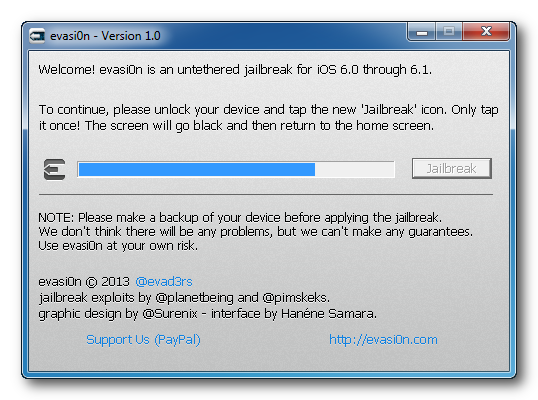
Finally evad3rs team has released official jailbreak for iOS 7. According to evad3rs team jailbreak is Compatible with all iPhone, iPod touch, iPad and iPad mini models running iOS 7.0 through 7.0.4.

Download

Note: Backup your device using iTunes (or iCloud) before using evasi0n. If something breaks, you'll always be able to recover your data.

Wednesday, January 1, 2014

This licence exploit allows users to get IntelliscreenX 6 registered on there iDevices for free. You only have to follow these simple steps :

IntelliScreenX7 is out!! Get it for free here

    IntelliscreenX6
  1.  First of all add "apt.iphonecake.com" repo on cydia.
  2.  After that Install IntelliscreenX and respring.
  3.  Don't open IntelliscreenX now, go back to cydia and uninstall IntelliscreenX.
  4.  After you have uninstalled it, open cydia and install official IntelliscreenX (from Modmyi repo)
  5.  Now IntelliscreenX will be displayed on your Springboard but don't open it.
  6.  Go to settings and configure IntelliscreenX from there,  exit Settings and open your notification center.
  7.  Congrats!! you should now have a fully functional IntelliscreenX on your device. 
Note: Open IntelliscreenX from setting only, Never open it from springboard. 

Best cydia sources/repo for iPhone/iPad/iPod

Get paid apps for free in iPhone/iPad/iPod

Thursday, April 11, 2013

Now we can easily install any cracked apps in iPhone/iPad and any other iDevices. It's a chinese trick  to bypass application verification system of iDevices. It's 100% working just like apps you purchase from Appstore. Just follow these instructions or watch this video.

First of all you need to download a chinese application for windows from here.
For other OS download this apps from here.


Install it on your computer then follow these screenshots :


Now you have done all. Enjoy !!.  Please like us on facebook and follow us on twitter .. :)

Wednesday, March 20, 2013


Temple Run 2 is a very famous game released by Imangi Studios. Here is  a hack for Temple Run 2 which will give you almost unlimited coins , gems and all Character unlocks for free.


Temple Run 2 hack features:

  • Get 9,555,000 Coins
  • Get 100,000,000 Gems
  • All Characters purchased & unlocked

Steps: 

  • Download Temple Run 2 from here.
  • Unzip the file.
  • Copy the folder "Documents" to "var/mobile/Application/Temple Run 2/"
  • Overwrite existing files.
  • Done. Enjoy Temple Run 2 hack !!!

Sunday, March 17, 2013


There are some ways to install deb files to iDevices, but you need to manage the file manually and that's so irratating and tiresome for some users. So here's a very easy way to install .DEB file on your iPhone/iPad. Just follow this simple steps to install deb file in one click.


Requirements:

  •  Jailbroken iDevice
  • Computer
  • iSpirit (Download from here.)

Steps:

  1. Download iSpirit to Computer.
  2. Connect your iPhone/iPad/iPod to computer.
  3. Click the 'install deb' button on iSpirit and select a deb file. 
  4. Click install button then iSpirit will install DEB automatically.

IntelliScreenX 6 is a cydia tweak launched by Intelliborn in the BigBoss Repo which price is 19.99$ and it is almost impossible to find it's crack anywhere. But don't worry here i'm providing you the crack of IntelliScreenX 6 for free. This is a must have tweak for your iPhone.


IntelliScreenX7 is out!! Get it for free here

Features of IntelliScreenX 6 :

  • View Calendar, Email, Text Messages, News, Facebook, Twitter, Weather, and more from your iPhone "Slide To Unlock" screen
  • Taskbar Icons for Missed Email, SMS, Phone calls, and Silent status
  • View/Mark Read/Unread/Delete your Emails from the Lock Screen
  • Completely integrated into iOS6 Notification Center
  • Post/Comment/Tweet from anywhere
  • Advanced RSS Reader uses iOS 6 Reader to show "just" news
  • QuickView/Preview Entire Email
  • Reply to SMS/iMessages with Message+ (free)
  • Integrated Twitter and Facebook pages
  • Access QuickSettings like brightness, airplane mode, Bluetooth +
  • Can "pull down" and display in any app! 

 Click  here (Link Updated : 2014 - 11 - 17) to download IntelliScreenX 6 Cracked


Best cydia sources/repo for iPhone/iPad/iPod

Get paid apps for free in iPhone/iPad/iPod

Wednesday, February 27, 2013

List of best cydia repo of 2011-2013 to download premium cracked apps free to your iDevices.
Here you can find the best Cydia apps, tweaks & themes for ios iOS 4/iOS 5/iOS 6.
IMG_CYDIA


  1. Insanelyi - http://repo.insanelyi.com
  2. SinfuliPhone - http://sinfuliphonerepo.com
  3. HackYouriPhone - http://repo.hackyouriphone.org
  4. xSellize Source -  http://apt.xsellize.com
  5. iHacksRepo - http://ihacksrepo.com
  6. iAP Cracker - http://cydia.myrepospace.com/urus
  7. BiteYourApple - http://repo.biteyourapple.net
  8. iHackstore Repo/Source - http://ihackstore.com/repo
To add these sources on cydia follow these steps : 

1. Open Cydia on your jailbroken iDevice and Click manage then click on sources.


2. Then click on Edit and then click on Add.


3. Once you click on add a popup box will appear , add cydia/APT URL there.
for example: http://repo.insanelyi.com


Tuesday, February 26, 2013

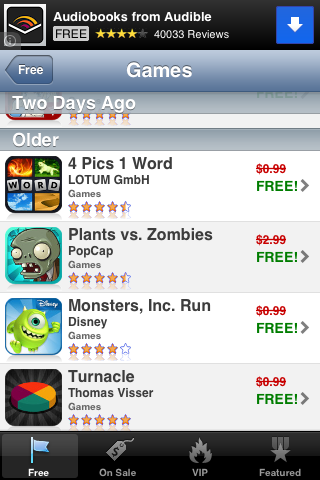
Do you want to get premium apps on your iPhone for FREE full version without jailbreaking!!! Then just go ahead........


    1. Download these three apps from given link below:
Note: after clicking on given link a new window will open then click on Skip add on the top right corner.
After that you will be redirected to Itunes.

After downloading and installing these apps on your iDevice you can get each day a paid apps for free!!!

Saturday, February 23, 2013


This is an alarming news for those who use passcode lock to protect their iPhones from unauthorized access to iphone contacts, calls and other data. Below are few complicated steps that can unlock the passcode for any iphone. Have a look and do it carefully, also don’t trust on passcode unlock because anybody can break your passcode as well.


  • At first follow normal slide to unlock.
  • Tap emergency call and press and hold sleep/power button until you will see the prompt to turn the power Off. Tap cancel and the status bar will turn to blue.
  • Now type 911 as emergency number and tap Call and immediately cancell the call.
  • Follow these sequences :
    •  Lock the iphone using power button and turn it on using the home button.
    • Slide to unlock and hold the power/sleep button plus in next 3 seconds tap again emergency call.
    • The iphone’s contacts and call history will become available to see.
    • Note: At this time you should not release the power button otherwise again passcode will be applied.
Don’t try to breach the privacy of others phone using this procedure.

Evasi0n is one of the most popular jailbreaks tools ever released. Just a few days after its debut, the tool had been downloaded and used by more than 7 million people. Evasi0n supports all Apple mobile devices running iOS 6.0 through 6.1.2, including the iPhone, iPad, iPad Mini, and iPod Touch.

Devices supported by Evasi0n :

  • iPhone 5
  • iPhone 4S
  • iPhone 4
  • iPhone 3GS
  • iPad mini
  • iPod touch 5G
  • iPod touch 4G
  • iPad 4
  • iPad 3
  • iPad 2
  • iPod touch 5G
  • iPod touch 4G

Steps:

  1. First of all download the latest version of Evasi0n from below link ...
  1. Extract the downloaded file in your Computer.
  2. Connect your Iphone, Ipod or Ipad to PC and Run Evasi0n program.
  3. Evasi0n will detect your Idevice, after that click on the jailbreak button on the evasi0n.
  4. After a while you will see a message that tap a new jailbreak icon on your device, just unlock your device and tap the new jailbreak icon.

  5.  Wait for Evasi0n to Jailbreak your device, After the process is completed your device will boot with “Cydia” app.
  6. Once you see completed message on evasi0n, you are done now you can run the Cydia and enjoy the new jailbreak on your idevice. Happy Jailbreaking!!!!

Note: Disable passcode lock before trying. If you are experiencing troubles then restart your computer, switch USB ports and try again. If you still problems occurs then a factory restore on iOS 6.1 may be necessary before reattempting. Avoid all iOS and iTunes related tasks until evasi0n is complete. If the process gets stuck somewhere, it's safe to restart the program, reboot the device (if necessary by holding down Power and Home until it shuts down), and rerun the process.

Please like, share and comment if you like this tutorial....


Wednesday, February 6, 2013

After long waiting, Finally working untethered jailbreak for IOS 6.1 and all other previous series has been released by the team Evad3rs i.e Evad3rs. 


Evasi0n is an untethered jailbreak, and it works on every iOS device capable of running iOS 6 except Apple TV. That means that you can now jailbreak the iPhone 5, the iPad mini, the iPad 4, the iPad 4, iPad 3, the iPhone 4S, and various other iOS devices with evasi0n. Check inside for more information along with the download link.

Rooted IPhone 3Gs with IOS 6.1 (Cydia store)

SYSTEM REQUIREMENTS:

  • MacOSX 10.5/10.6/10.7/10.8
  • Windows (XP minimum)
  • Linux x86/x86_64 (Kernel >= 2.6.24, libgtk+-2.0 >= 2.24.13)


INSTRUCTIONS:

  • First of all Backup your IPhone's data using ITunes/ICloud.
  • If you have used backup passwords in iTunes disable them for now.  After doing so, iTunes makes a brand new backup.  Please wait for that backup to complete before proceeding!  Feel free to re-enable your backup password after jailbreaking.
  • Please disable the lock passcode of your iOS device before using evasi0n. It can cause issues.
  • Launch evasi0n, plug in your device, and click "Jailbreak".
  • Now it'll start injecting jailbreak data to your IPhone this includes Cydia and other resources.
  • After sometime it'll prompt you to unlock your device and tap the jailbreak icon which is newly installed in your phone. Tap that icon only once.
  • At last click on Exit.
  • Aour device will reboot and let the tasks to complete in your phone.
  • Congrats! you have sucessfully rooted your IPhone. Enjoy!!

Plz like, share and comment if this works for you.

ScreenShots:

Evasion Start screen

Injecting jailbreak data

Asking to tap jailbreak icon on IPhone

Injecting final jailbreak data

Uploading Cydia


    Note: Avoid all iOS and iTunes related tasks until evasi0n is complete. If the process gets stuck somewhere, it's safe to restart the program, reboot the device (if necessary by holding down Power and Home until it shuts down), and rerun the process.


    ;"Okay, it’s time to celebrate. After a long waiting team of hac-kers/developers is now managed to develop a tool named Evasi0n for IOS6 Jailbreak.
    The team of Plantbeing Pod2g Pimskeks and MuscleNerd worked hard and after perfect examination and hundreds of testings, they decided to release the this tool Evasi0n on 4th February 2013 for completely free.
    Evasi0n, is a free too availiable to download now. Using this tool you can jailbreak IOS6 devices and also they claimed, it even works on all new devices running on A4, A5 and A6X processors.
    This free tool is claimed to contactable with iPhone, iPod Touch and iPad running on IOS 6


    Team of developers
    Before starting making use of this free tool, please feel free to know about the developers who worked hard to finish this awesome Evasi0n tool. Here are twitter profile links of all developers who had took serious part in developing this tool.

    Official Download Links of Evasi0n

    Please don’t make mirrors for these download links and use the official download links to download Evasion tool to jailbreak IOS6 devices.

    Friday, February 1, 2013


    Note: This is for educational purpose only.  This is a tethered jailbreak for iPhone 5.
    you need some files you can download these files below according to your Operating System.

    STEPS

    1. First of all Download Files for your iPhone 5 from above list.
    2. Set your Apple iPhone 5 to DFU mode by Holding  Home+Power for 10 seconds, release Power but still holding Home for more 10 seconds. The screen should remain black.
    3. Open the RedSn0w 0.9.15b1 which is included in downloaded files.
    4. Now click jailbreak .Some items will load, after that you will see “Please Select Your Options”.Ensure that install Cydia is checked if not Please check that this will install cydia app for you,and after click next.The process of jailbreaking will finish in 5-7 minutes.
    5. Once the process is completed you will be back to your home screen,then after that you to again set your device to DFU mode.
    6. Now go back to Start page of RedSn0w,and select Extras ,after that select Just Boot ,this will a tethered boot.After the boot process you will see Cydia app installed.
    7. Finished jailbreaking iPhone 5  check version in settings.
    ENJOY!!!
    We are not responsible for any Damage caused to your device while jailbreak process.                                
                                                                                                                reference: http://iphone-5jailbreak.org

    Popular Posts

    Recent Posts